Last updated:
DIGI CLIP is an Australian-built mobile checklist and inspection platform made by Safety Tracker Pty Ltd. Teams complete pre-starts, inspections, audits and reports on a phone or tablet, problems become assigned actions in the Action Log, and every fix is closed out with evidence. Its message is simple: Inspections. Actions. Evidence.
What Is DIGI CLIP? Mobile Checklists, Inspections and Actions Explained
DIGI CLIP replaces paper checklists and clipboards with mobile forms, then makes sure the problems those forms find actually get fixed. It’s used by transport, logistics, warehousing, agriculture, construction, field service and other businesses that need to check equipment and workplaces every day and prove it was done. This page explains how DIGI CLIP works, its main features, who uses it, and how to get started.
Key points
- Mobile checklists, inspections, audits and reports on iOS and Android, with a web dashboard.
- Smart fields create an action automatically when an item fails.
- The Action Log tracks every action to close-out, with escalation for overdue items.
- Forms are location- and time-stamped, with photos and digital signatures.
- Built in Australia, with customers in Australia, New Zealand, Canada, the UK and the US.
How DIGI CLIP works
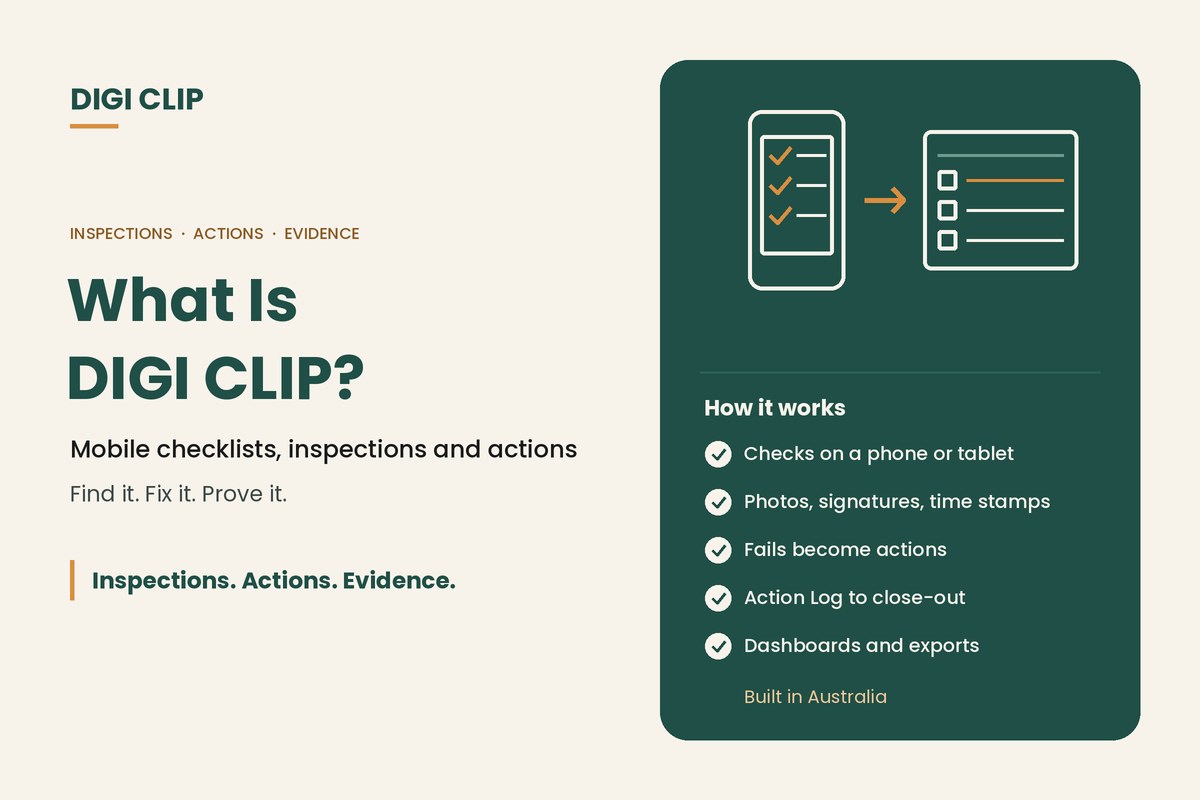
DIGI CLIP follows one simple loop: Find it. Fix it. Prove it.
| Step | What happens |
|---|---|
| Find it | Workers complete a checklist or inspection on their phone, with photos, comments and a signature. Forms are location- and time-stamped. |
| Fix it | When an item is marked “No”, “Not OK” or “At Risk”, a smart field creates an action in the Action Log for the right person to fix. |
| Prove it | The action is closed out with evidence, such as a photo and note or a close-out verification form, and the record is kept for audits. |
See Find it. Fix it. Prove it. for more on the approach.
Key features
- Mobile app: iOS and Android, with photo capture, smart fields and digital signatures, and forms that can be completed without coverage.
- Action Log: every failed item becomes an assigned action. “View source” opens the original report with photos, overdue actions escalate by email, and actions can use one-step or two-step close-out.
- Evidence: location and time stamps, photos, signatures and close-out records on every form.
- Recurring checks: reminders when a check is due.
- Form Library: ready-made templates across nine industry sectors, which you can use as-is or tailor. See the Form Library.
- Dashboards and exports: dashboards on all plans, and exports to PDF, Excel and CSV, including bulk PDF export.
- Safety Tracker: included in the Compliant plan, with hazard assessments using a risk matrix, incident investigations that feed corrective actions into the Action Log, and LTI and LTIFR tracking.
Who uses DIGI CLIP
- Transport and logistics: truck and light vehicle pre-starts, load checks and driver maintenance requests. See our truck pre-start checklist app.
- Warehousing and cold storage: forklift pre-starts, warehouse inspections and temperature records.
- Agriculture and aquaculture: machinery pre-starts, farm safety audits and vessel checks. See commercial fishing and aquaculture.
- Construction and plant: site inspections and plant pre-starts. See our heavy equipment inspection app.
- Field operations and small businesses: inspections, audits and incident reports without a dedicated safety team.
Is DIGI CLIP the right fit?
DIGI CLIP is built for businesses that need their people to complete checks in the field and want every problem followed through to a fix. It suits teams of any size, with no minimum number of users. It focuses on inspections and actions rather than full maintenance management, so it doesn’t include an asset register or work orders. Businesses that need those often use DIGI CLIP alongside their maintenance system.
Getting started
- Start a free trial. Sign up for a 14-day free trial with no credit card required.
- Pick your first form. Choose a template from the Form Library or build your own.
- Set up who gets actions. Decide who should receive actions when items fail.
- Invite your team. Add users and have them download the mobile app.
- Run a trial. Use the form with a small team and adjust the questions.
- Roll out and review. Add more forms and use dashboards to track completion and open actions.
Plans and billing
DIGI CLIP is billed monthly, and you can change plans and add or remove users at any time. Every plan includes the mobile app and dashboards. The Lite plan includes up to five form templates, and the Compliant plan adds Safety Tracker.
Illustrative scenario: a first week with DIGI CLIP
A small civil contractor starts a trial with a plant pre-start template from the Form Library. On day two, an operator marks a hydraulic hose as “Not OK” and adds a photo. An action lands in the Action Log for the fitter, the hose is replaced that afternoon, and the action is closed out with a photo. By the end of the week, the manager can see every machine’s pre-start on one dashboard.
This scenario is illustrative. It shows how a business could use DIGI CLIP and is not an account of a specific customer.
Want to compare options first? See our guide to choosing an inspection checklist app and mobile forms for business.
Try DIGI CLIP Free
Put your checklists and inspections on your team’s phones and see problems land in the Action Log, ready to fix and prove.
Start Your 14-Day Free TrialNo credit card required. Set up in minutes.
Frequently asked questions
What is DIGI CLIP?
DIGI CLIP is an Australian-built mobile checklist and inspection platform. Teams complete pre-starts, inspections, audits and reports on a phone or tablet, problems become assigned actions in the Action Log, and every fix is closed out with evidence.
Who makes DIGI CLIP?
DIGI CLIP is made by Safety Tracker Pty Ltd, an Australian company. It has customers in Australia, New Zealand, Canada, the UK and the US.
Does DIGI CLIP work offline?
Yes. Forms can be completed in the mobile app without coverage. Completed forms are saved and submitted with a tap once the device is back online.
What is the DIGI CLIP Action Log?
The Action Log is where every failed item becomes an assigned action. It tracks actions through to close-out, escalates overdue actions by email, and keeps the evidence that each one was fixed.
Does DIGI CLIP have ready-made templates?
Yes. The Form Library has ready-made templates across nine industry sectors, which you can use as-is or tailor to your business.
How is DIGI CLIP billed?
Monthly. You can change plans and add or remove users at any time, and there’s no minimum number of users. A 14-day free trial is available with no credit card required.
About DIGI CLIP Mobile Forms
DIGI CLIP is an Australian-built mobile checklist and inspection platform. Inspections. Actions. Evidence. Teams complete checks on a phone or tablet, turn defects into assigned actions, and keep the proof that each one was fixed and verified.
See our Form Library for ready-made templates.